News
How to Make an Online Savings Deposit Easily and Earn Attractive Returns
 05/11/2026
Learn how to make an online savings deposit on SeAMobile in 4 steps, including requirements, interest rates, early withdrawal, and deposit insurance.
If you want to open a savings account without visiting a transaction counter, you can make an online savings deposit directly through SeABank's SeAMobile app. With just a few steps on your phone, you can choose the deposit amount, term, and savings option that suit your needs. This article provides step-by-step instructions, along with the requirements, interest rates, legal regulations, and important considerations when making a deposit.
1. Requirements for Making an Online Savings Deposit at SeABank
To make an online savings deposit, you need to prepare the following:
- A SeABank payment account: Used to debit the amount for opening the savings account and receive the principal and interest upon maturity.
- The SeAMobile app: You must be registered, able to log in, and have completed the authentication required by SeABank.
- A sufficient account balance: The minimum deposit amount depends on each product and SeABank's regulations applicable from time to time.
- Meet the age requirements prescribed by law: Under Article 3 of Circular No. 48/2018/TT-NHNN, eligible savings depositors include Vietnamese citizens aged 18 or older with full civil act capacity; and Vietnamese citizens aged from 15 to under 18 who do not have restricted civil act capacity or have not lost their civil act capacity.
In addition, each product may have its own requirements. You should refer to SeABank's Savings page to select a suitable product before making a deposit.
2. How to Make an Online Savings Deposit on SeAMobile
You can open an online savings account on SeAMobile in 4 steps:
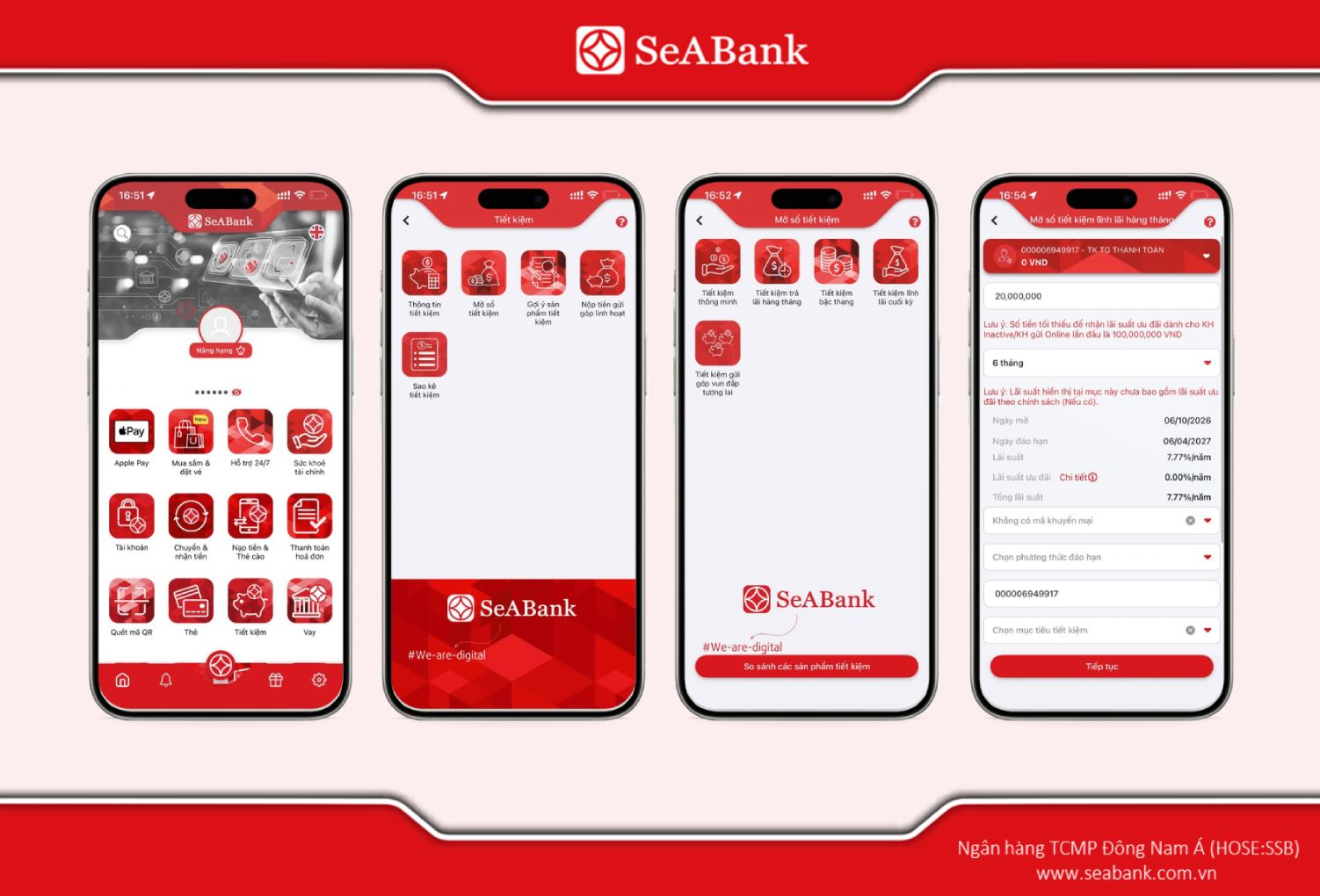
- Log in to the SeAMobile app
- Download SeAMobile from the App Store or Google Play if you have not installed it yet.
- Log in using your registered account.
- Select the "Savings" function
- Carefully read and confirm your agreement to the product's terms and conditions.
- Enter your deposit information
- Select the account to be debited and enter the amount you want to deposit.
- Select a savings term and savings option that suit your needs.
- Check the interest rate and maturity date displayed by the system and select a maturity option (if any).
- Review and confirm the transaction
- Review all information carefully before confirming.
- Authenticate the transaction as instructed on the app (for example, using biometric authentication or an OTP code).
- Once the transaction is successful, the deposit will be recorded in your savings account.
Note: In the online savings deposit process above, the names and locations of functions in the app may vary depending on the SeAMobile version.
You do not have the app yet? Download SeAMobile and open an online savings account in just a few minutes.
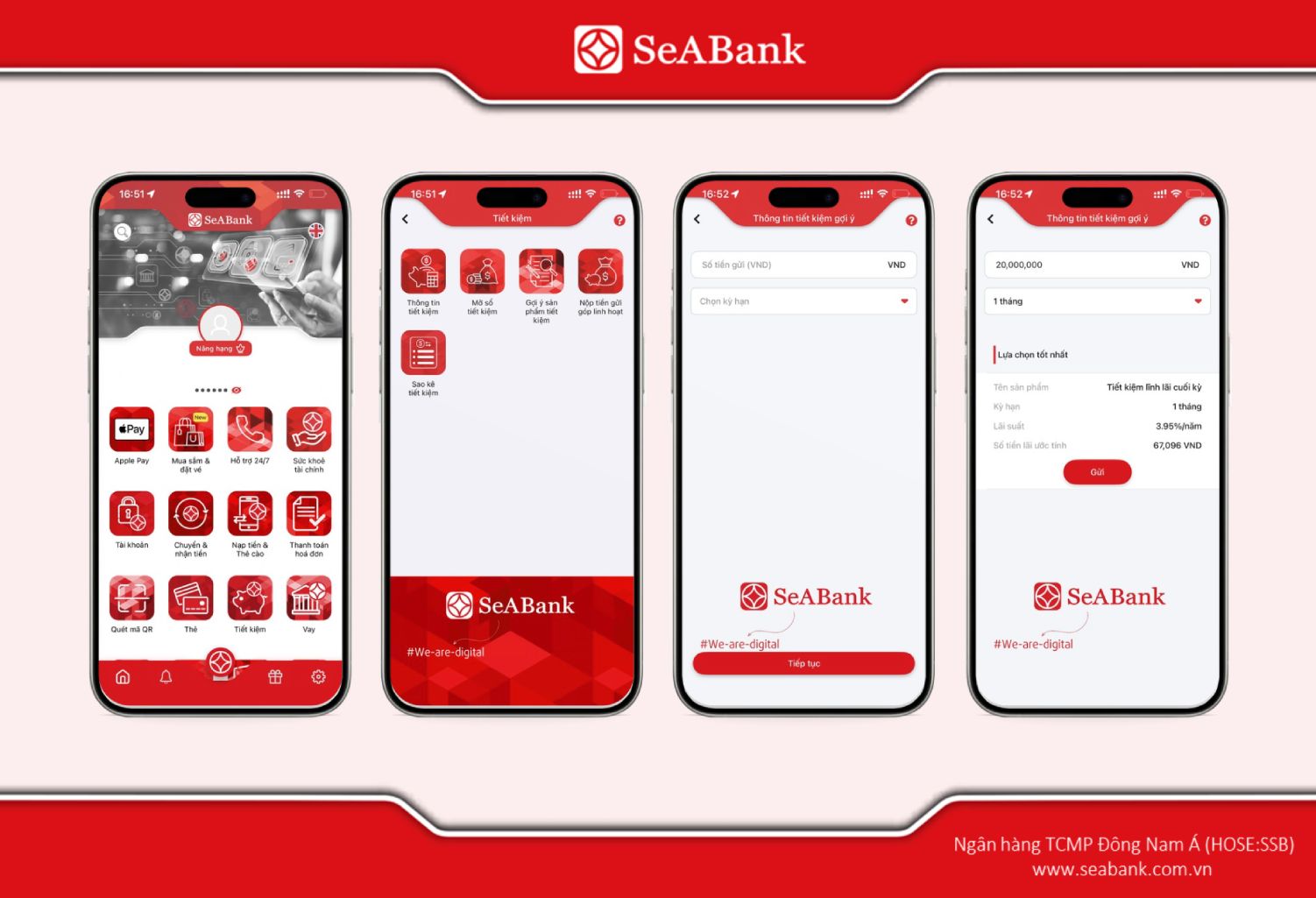
3. SeABank Online Savings Interest Rates
SeABank's deposit interest rates generally vary depending on the deposit term and method (at a transaction counter or online through the SeAMobile app). When making an online savings deposit, customers may receive more attractive preferential interest rate policies than with traditional over-the-counter transactions.
Note: Interest rates may change depending on the bank's market policies from time to time. You can check the latest information directly through SeABank's Interest Rate Portal or call the hotline at 1900 555 587 for updates.
4. Frequently Asked Questions (FAQ) About How to Open an Online Savings Account
1. Is It Safe to Make an Online Savings Deposit at SeABank?
Yes. SeABank applies multi-layer security, combining biometric authentication and OTP codes for transactions on the app. In addition, individual savings deposits denominated in Vietnamese dong are covered by deposit insurance in accordance with applicable laws and within the applicable coverage limit. You should also proactively protect your login information and OTP codes.
2. Can I Withdraw My Online Savings Deposit Before Maturity?
Yes. Early withdrawal is subject to the agreement between SeABank and the customer when the deposit is made. Generally, the amount withdrawn before maturity is only entitled to the demand deposit interest rate, so you should carefully consider the appropriate term from the outset. You can also refer to SeABank's Smart Savings product for greater flexibility.
3. How Can I Check My Online Savings Account?
Log in to SeAMobile and go to the Savings section to view your savings accounts, balances, accrued interest, and maturity dates. The name of the section may vary depending on the app version.
4. What Is the Minimum Amount Required for an Online Savings Deposit?
The minimum amount generally starts from 50,000 VND. However, the specific amount depends on each product and SeABank's regulations applicable at the time. You can check this information when selecting a product on SeAMobile or on SeABank's Savings page.
Understanding how to make an online savings deposit gives you greater control over managing your idle funds. You only need to prepare a payment account, install SeAMobile, and follow the steps above. Before making a deposit, check the interest rates, term, and settlement conditions to choose a deposit that suits your financial goals. Download SeAMobile and open an online savings account today!
Related News
What Is Flexible Savings? Comparison with Traditional Savings 05/11/2026
Online Land Tax Payment: 2 Quick and Compliant Methods 05/11/2026
Borrowing Money with Group 5 Bad Debt: Eligibility and Solutions 05/11/2026
How Much Is 1 Tael Of Gold? Update Today's Gold Price And Notes 05/11/2026
Tiền Đài Loan: Mệnh giá, tỷ giá và kinh nghiệm đổi tiền mới nhất 05/11/2026

What Is Flexible Savings? Comparison with Traditional Savings
What is flexible savings? Learn about the concept, key features, differences from traditional savings, and minimum balance requirements when making a partial early withdrawal.
05/11/2026
Read more

Online Land Tax Payment: 2 Quick and Compliant Methods
Guide to paying land tax online via the National Public Service Portal and eTax Mobile, including the steps, payment deadlines, late payment charges, and important notes you should know.
05/11/2026
Read more
Borrowing Money with Group 5 Bad Debt: Eligibility and Solutions
Can you apply for a loan when having group 5 bad debt? Learn about CIC regulations, avoid predatory loan traps, and discover effective debt resolution solutions.
05/11/2026
Read more