How to Create a Bank QR Code on SeAMobile in Just 3 Steps
09/10/2026
Learn how to create a QR code to receive money on the SeAMobile app in 3 simple steps, along with how to share and scan QR codes for payments and important usage tips.
When you need to receive money from friends, business partners, or customers, creating a bank QR code saves you from repeatedly providing your account number and account holder's name. The sender only needs to scan the code, and the beneficiary information will be filled in automatically. This article guides you through creating a QR code to receive money on the SeAMobile app in 4 steps, along with how to use QR codes safely.
Note: The figures and information in this article are compiled from general market sources and do not apply exclusively to SeABank's products.
1. What Is a Bank QR Code and What Types Are Available?
A QR code for receiving money contains the beneficiary account information, including the bank name, account number, and account holder's name. When someone scans the code, the app automatically fills in this information, and the sender only needs to enter the amount, transfer description (if needed), and authenticate the transaction. This significantly reduces the risk of entering an incorrect account number.
Common types of payment QR codes at SeABank
Static QR code: Contains fixed information for a payment account. You can share it online, print it out, or display it to receive money multiple times. The sender enters the amount and transfer description themselves.
Dynamic QR code: Created separately for each order, with the amount and payment description already included, and commonly used in business sales systems.
The QR code for receiving money on SeABank's banking app for individual customers is a static QR code linked to your account.
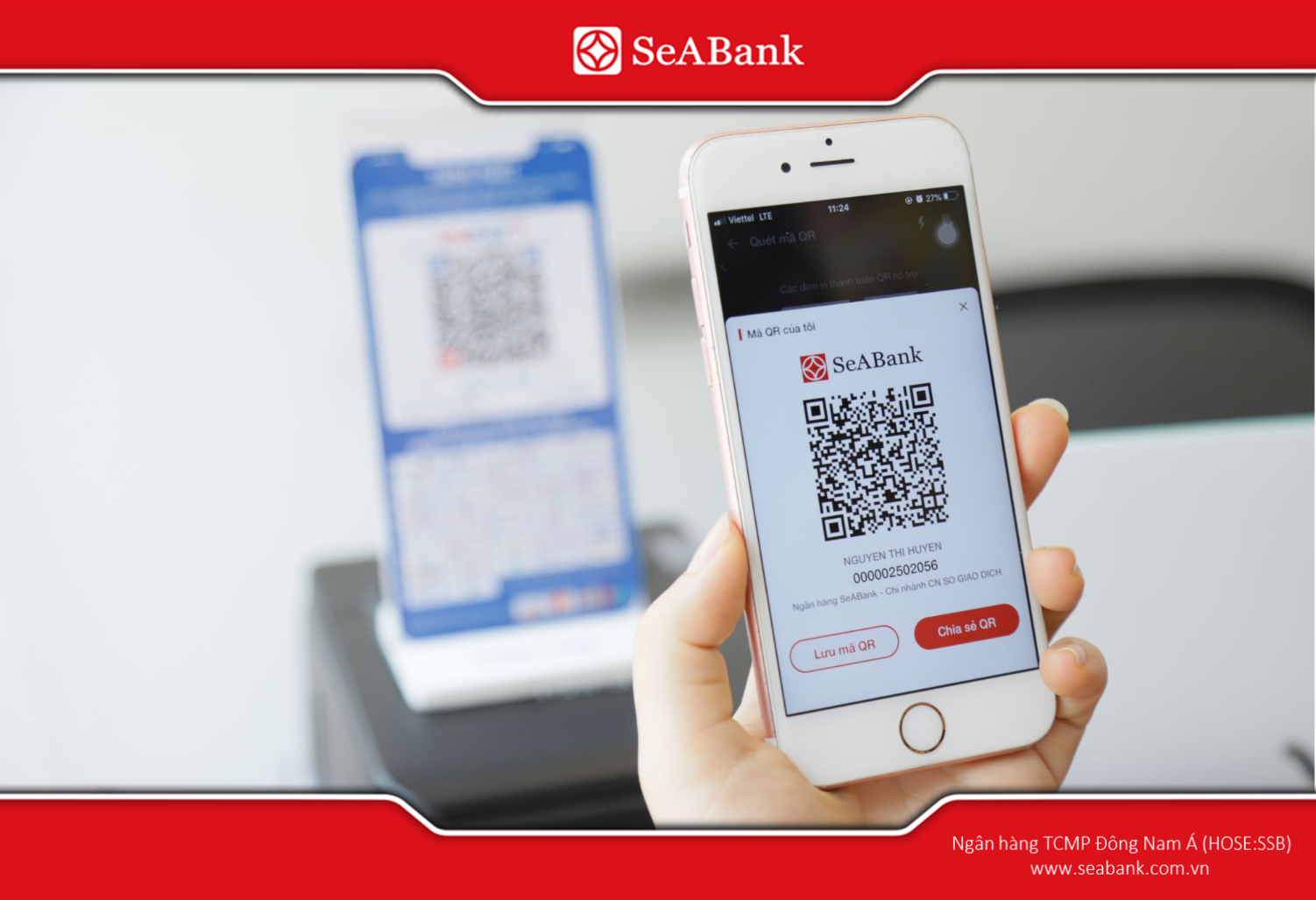
A QR code for receiving money contains the beneficiary account information, allowing the sender to simply scan the code
2. 3 Steps to Create a Bank QR Code on SeAMobile
To create a QR code for receiving money, you need to install and log in to theSeAMobile App (SeABank's digital banking app for individual customers). Then, follow these steps:
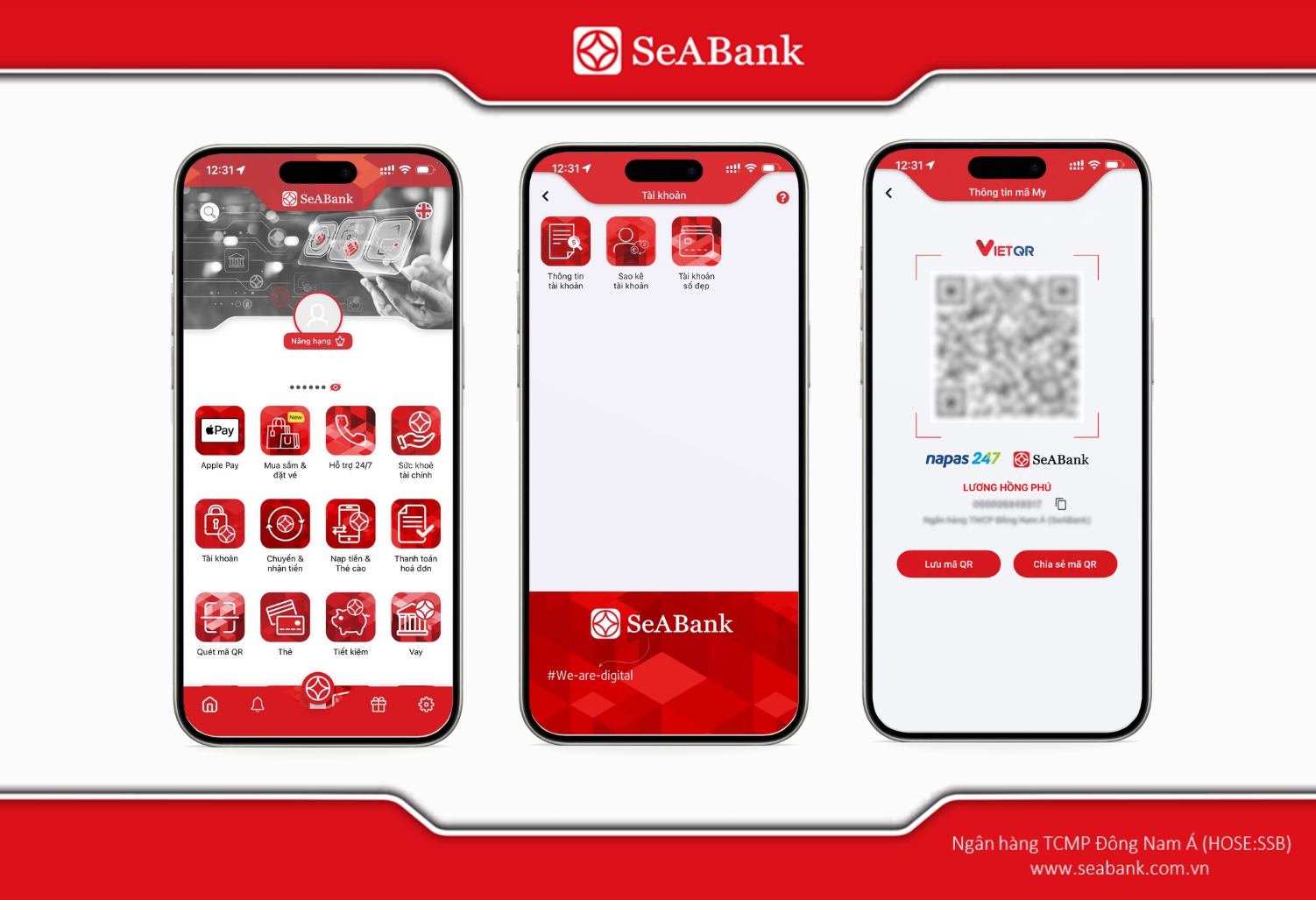
Step 1: Log in to the SeAMobile app, select Account, then select Account Information.
Step 2: On the Account Information screen, tap the QR code icon to display the code.
Step 3: Save the QR code by taking a screenshot or selecting Save QR Code. If you want to send the code to someone else, select Share QR Code and then choose the app you want to use for sharing.
Note: The interface and menu names may vary depending on the app version. You should update SeAMobile to the latest version for a more convenient experience.
Don't haveSeAMobile* yet?** Install it today to create your own personal QR code and receive money transfers more easily than ever!*
Steps to create a QR code for receiving money on the SeAMobile app
3. How to Use SeABank QR Codes
Once you have a QR code, you can use it in two ways: share it to receive money or scan someone else's QR code to make a payment.
3.1. Share a QR Code to Receive Money
Send the saved QR code image via message, email, or communication apps to the person who needs to transfer money.
Alternatively, open the QR code directly on SeAMobile and let the sender scan it.
Once the transaction is successful, you can check the amount received directly on the app.
For sellers, a static QR code can be printed and displayed at the counter for customers to scan when making payments.
3.2. Scan a QR Code to Make a Payment on SeAMobile
Step 1: Log in to SeAMobile and select Scan QR Code.
Step 2: Point the camera at the QR code you want to scan, or select Choose from Photo Library if the QR code has already been saved on your device.
Step 3: Enter the amount (and transfer description if needed), double-check the recipient's information, and then authenticate the transaction as instructed on the app.
4. Important Notes for Creating and Using QR Codes Safely
To minimize risks when making transactions using QR codes, you should keep the following points in mind:
Only scan QR codes from trusted sources. Some fraudsters send fake QR codes with messages such as "receive money", "refund", "promotion", or "transaction confirmation" to direct customers to fraudulent websites or initiate unintended money transfers.
Check the information before confirming. After scanning, verify the account holder's name, beneficiary bank, and amount before authenticating the transaction.
Do not provide your password or OTP code to anyone, even if they claim it is required to receive money or obtain a refund.
Only download apps from official app stores and do not click on unfamiliar links.
If you suspect fraud, immediately contact the SeABank Call Center at 1900 555 587 or the nearest transaction office for assistance.
5. Frequently Asked Questions About Creating QR Codes
1. Is there a fee for creating a QR code?
According to information shared by SeABank, static QR codes and semi-dynamic QR codes are generally created free of charge on most digital banking apps, e-wallets, and QR code generation platforms. Dynamic QR codes, however, usually require sales software to generate. You should check SeABank's official information for the applicable fee schedule at the time of the transaction.
2. Does the sender have to pay a fee when scanning a QR code?
According to SeABank's policy, the payer and recipient generally do not incur fees for transactions made via QR codes.
4. Can I scan a QR code saved on my phone?
Yes. On SeAMobile, after selecting Scan QR Code, select Choose from Photo Library to use a QR code image saved on your device.
5. What is the difference between a static QR code and a dynamic QR code?
A static QR code contains fixed information for an account and can be used to receive money multiple times. A dynamic QR code is created separately for each order, contains a preset amount and payment description, and applies to only one transaction.
Creating a QR code on SeAMobile only requires a few steps: go to Account, open Account Information, select the QR code icon, and then save or share the code. Once you have the code, you can send it to the person transferring money or use the Scan QR Code feature to make payments. Download and log in to SeAMobile to create your QR code, and always carefully check the recipient's information before confirming a transaction.
Southeast Asia Commercial Joint Stock Bank (SeABank)