News
Online Land Tax Payment: 2 Quick and Compliant Methods
 05/11/2026
Guide to paying land tax online via the National Public Service Portal and eTax Mobile, including the steps, payment deadlines, late payment charges, and important notes you should know.
Each year, land users need to fulfill their tax obligations within the prescribed deadlines. Instead of going directly to the tax authority, you can pay land tax online on your phone in just a few steps. This article provides detailed guidance on 2 ways to pay land tax online via the National Public Service Portal and eTax Mobile, together with payment deadlines, late payment charges, and important notes you should understand.
1. What Is Online Land Tax Payment? Who Must Pay Land Use Tax?
Online land tax payment is a method by which land users fulfill their tax obligations through electronic platforms such as the National Public Service Portal or the eTax Mobile app, instead of going directly to the tax authority to submit documents and tax payments.
Under Article 2 of Consolidated Document No. 05/VBHN-VPQH consolidating the Law on Non-Agricultural Land Use Tax, taxable land includes residential land in rural and urban areas, non-agricultural production and business land, and certain other types of non-agricultural land used for business purposes.
Pursuant to Article 4 of this Law, taxpayers are organizations, households, and individuals with land use rights over the taxable land mentioned above. For special cases such as disputed land, land without a Land Use Right Certificate, or land used for apartment buildings, you should directly contact the managing tax authority to accurately determine your tax obligations.
2. Payment Deadlines and Late Payment Charges for Land Tax
Under Clause 1, Article 21 of Decree No. 252/2026, the deadlines for paying non-agricultural land use tax are as follows:
- First-time tax liability: No later than 30 days from the date the tax authority issues the tax payment notice.
- From the second year onward: Paid once a year, no later than October 31.
If tax is paid after the above deadline, under Clause 2, Article 16 of the Law on Tax Administration No. 108/2025/QH15 (effective from July 1, 2026, replacing the 2019 Law on Tax Administration), the taxpayer is charged late payment interest at 0.03%/day(*) on the overdue tax amount, calculated continuously from the day following the tax payment deadline.
(*) Note: The late payment rate above is stipulated under the Law on Tax Administration No. 108/2025/QH15 and its implementing documents and may be adjusted under regulations from time to time. You should check official information with the directly managing tax authority for the latest and most accurate updates.
3. Detailed Guide to 2 Ways to Pay Land Tax Online
Currently, you can pay land tax online using the following 2 common methods.
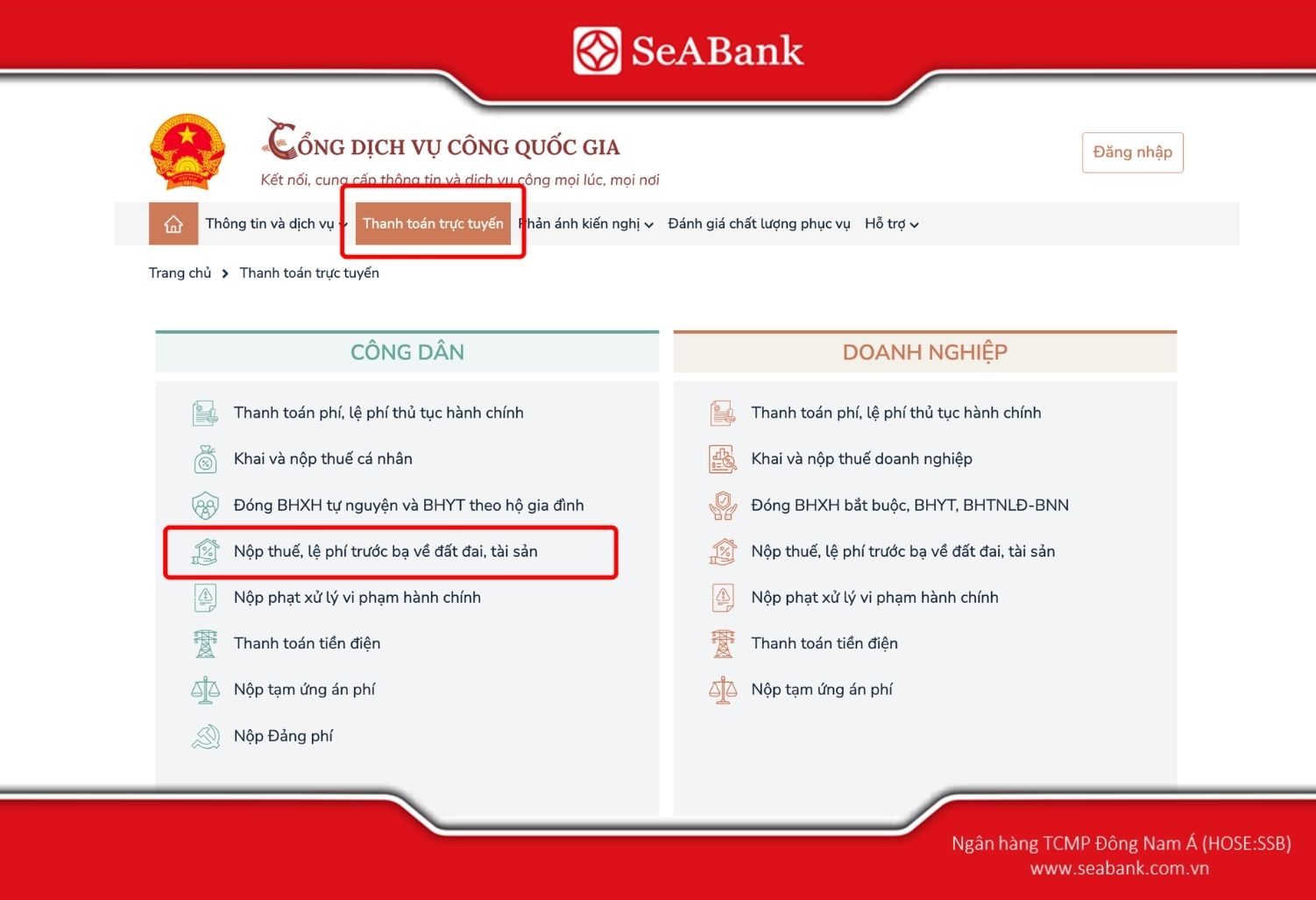
Method 1: Pay Land Tax Online via the National Public Service Portal
- Access the National Public Service Portal at dichvucong.gov.vn, then select Online Payment.
- In the section for CITIZENS, select Tax and Registration Fee Payment for Land and Property, then select Payment of Land-Related Financial Obligations.
- Log in using your National Public Service Portal account or an existing VNeID electronic identification account.
- Enter the application code or land plot information to look up the tax payable, then carefully check the amount displayed on the screen.
- Select a linked bank or e-wallet to make the payment, authenticate the transaction as instructed, and save the electronic receipt.
Method 2: Pay Land Tax Online via the eTax Mobile App
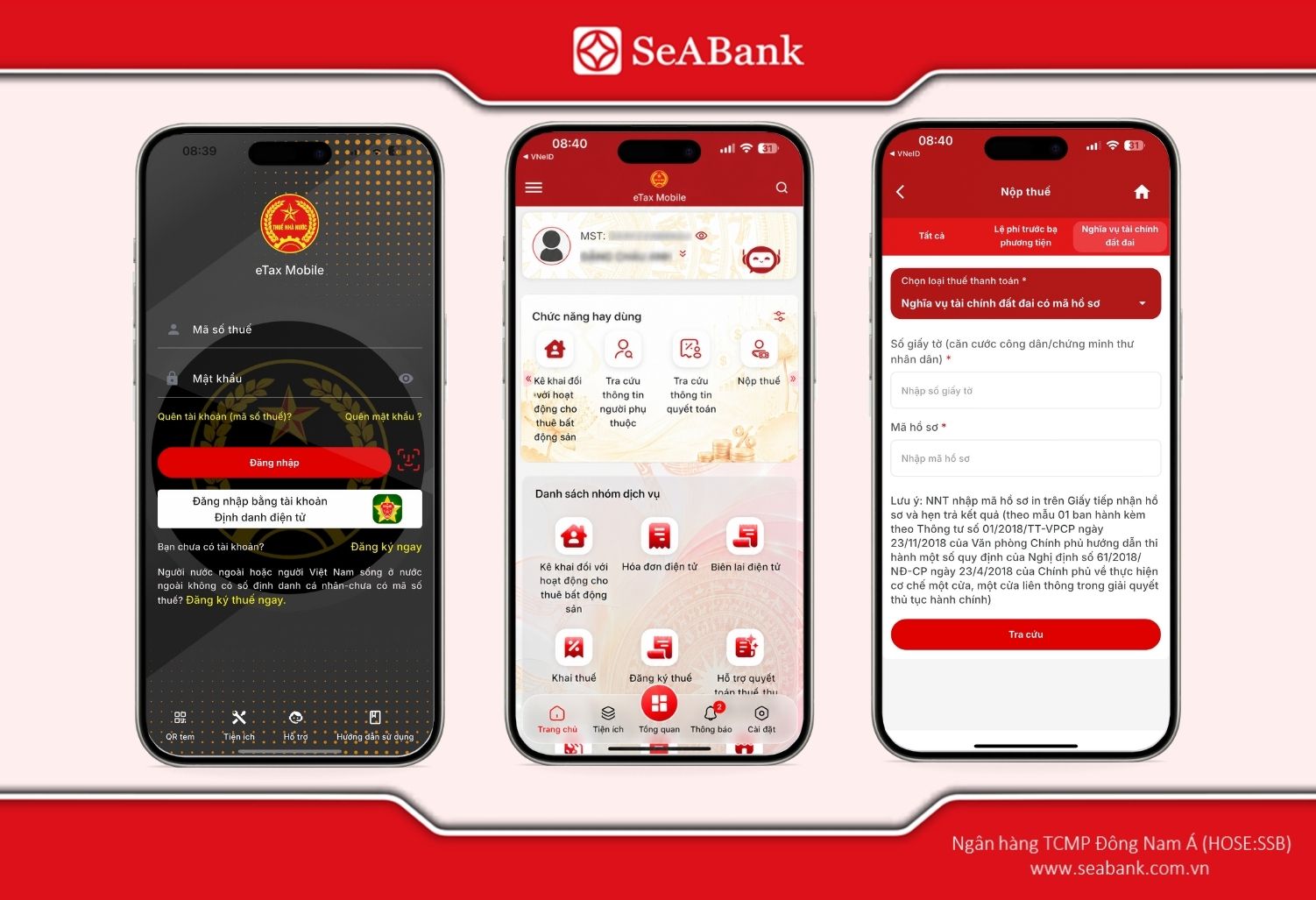
- Download and install the eTax Mobile app of the General Department of Taxation on your phone (Android or iOS).
- Log in using your registered tax code and password, or a Level 2 VNeID electronic identification account.
- Go to Tax Payment, select Link Account to link the bank account used for payment if you have not previously linked one.
- Select the land use tax obligation to be paid from the list of tax obligations and carefully check the payment information.
- Select the linked bank and authenticate with OTP to complete the transaction. The electronic tax payment date is recorded as the date the bank debits funds from your account.
4. Important Notes When Paying Land Tax Online
- Carefully check the application code, land plot information, and tax amount before confirming payment to avoid errors.
- Save the electronic tax payment receipt and documents for reconciliation when needed.
- Pay tax before October 31 each year to avoid late payment charges.
- If you forget your password or encounter errors when linking a bank account, you can contact the support hotline of the National Public Service Portal or the directly managing tax authority.
- If you are unable to complete the process online, you can still pay tax directly in cash or by bank transfer at a bank, the State Treasury, or the tax authority according to the information stated in the tax payment notice.
5. Frequently Asked Questions About Online Land Tax Payment
1. Is There a Fee for Paying Land Tax Online?
No. The tax authority and the State do not charge taxpayers any additional service fee for making online payments. If a transaction fee arises, it is a fee imposed and collected by the bank or payment intermediary (such as an e-wallet or payment gateway), depending on the time, payment channel, or type of card/account you use. You should carefully check the applicable fee schedule of the bank/payment intermediary before confirming the transaction.
2. Do Apartment Owners Have to Pay Land Use Tax?
The land area used for apartment buildings may be subject to non-agricultural land use tax and allocated among individual apartment owners in accordance with regulations. You should contact the local tax authority to accurately determine your tax obligations.
3. What Should You Do If You Forget Your Account or Login Password?
You can use the password recovery function on the National Public Service Portal or eTax Mobile, or log in using a Level 2 VNeID electronic identification account (if already issued) to continue the process.
4. Where Can You Pay If You Cannot Pay Land Tax Online?
You can still pay tax directly in cash or by bank transfer at a bank, the State Treasury, or the managing tax authority according to the information stated in the tax payment notice.
Above is a detailed guide to paying land tax online via the National Public Service Portal and eTax Mobile that you can follow. Proactively paying land use tax on time helps you avoid late payment charges while saving time spent traveling and waiting at the tax authority. We hope the information above helps you fulfill your land-related financial obligations quickly and accurately.
Convenient financial management with SeABank: In addition to paying land tax online, you can proactively monitor cash flow and carry out daily financial transactions anytime, anywhere with SeABank's SeAMobile digital banking app, secured with biometric technology. Learn more about digital banking features at SeAMobile - SeABank.
Related News
What Is a Savings Account? Types and a Quick Guide to Opening One 13/11/2026
What Is Online Savings? How to Save and 6 Important Notes 13/11/2026
How to Make an Online Savings Deposit Easily and Earn Attractive Returns 05/11/2026
What Is Flexible Savings? Comparison with Traditional Savings 05/11/2026
Borrowing Money with Group 5 Bad Debt: Eligibility and Solutions 05/11/2026

What Is a Savings Account? Types and a Quick Guide to Opening One
What is a savings account and how is it different from a payment account? Learn about common types of savings deposits, their benefits, and how to open an account online or at a branch.
13/11/2026
Read more


What Is Online Savings? How to Save and 6 Important Notes
What is online savings? Learn about its advantages, how to open a savings account on a banking app, and important notes on interest rates, security, and deposit insurance for online savings in this article.
13/11/2026
Read more

How to Make an Online Savings Deposit Easily and Earn Attractive Returns
Learn how to make an online savings deposit on SeAMobile in 4 steps, including requirements, interest rates, early withdrawal, and deposit insurance.
05/11/2026
Read more