Electronic Invoice Lookup: 3 Ways to Check Invoice Validity in 2026
09/10/2026
A guide to electronic invoice lookup using 3 methods: on the tax authority's system (with and without logging in) and on the seller's lookup portal. See the detailed steps.
When receiving an invoice from a business partner, many businesses and household businesses may wonder whether the document has been validly recorded. Electronic invoice lookup allows you to verify the seller's information, invoice number, and invoice status in just a few steps. This article provides instructions on 3 common lookup methods, along with important notes on the applicable legal basis, so you can perform the lookup correctly and quickly.
Note: The figures and information in this article are compiled from general market sources and do not apply exclusively to SeABank's products.
Method 1: Look Up Electronic Invoices on the Tax Authority's System (No Login Required)
This method is suitable when you only need to quickly check a specific invoice and do not have an account on the system. Follow these steps:
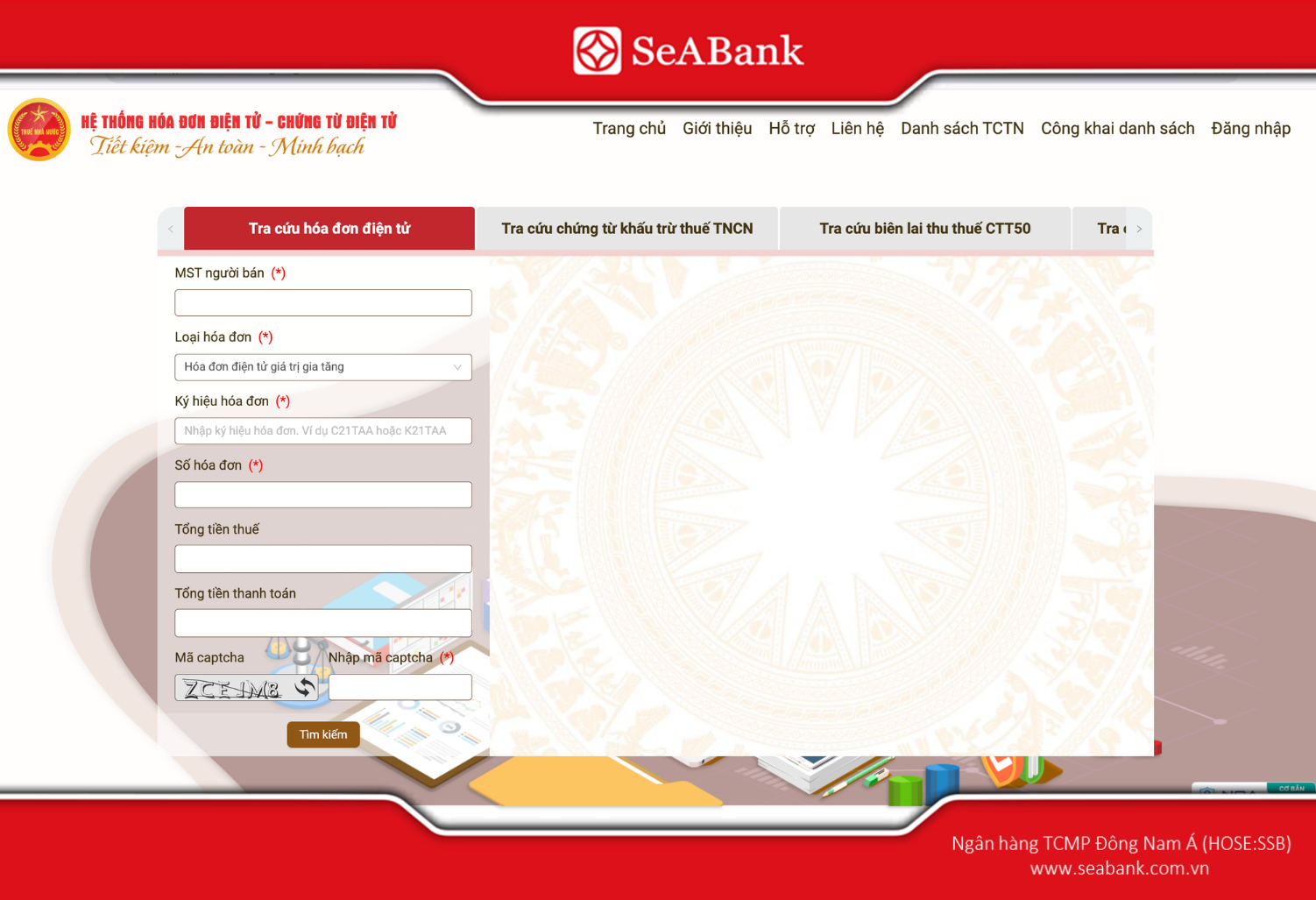
Step 3: Enter the invoice information according to the fields displayed on the screen.
Step 4: Click Search and check the results:
If the system displays the status showing that an invoice code has been issued: the invoice exists on the system.
If the system reports that no invoice with matching information exists: you should check the information entered or contact the seller for assistance.
Electronic invoice lookup interface without logging in on the tax authority's system
Method 2: Log In to the System to Look Up Purchase and Sales Invoices
With this method, you log in tohoadondientu.gdt.gov.vn using your tax code, password, and verification code (captcha), then select the option to look up sales or purchase invoices. This method is suitable for businesses and household businesses that need to view invoice lists by period for bookkeeping reconciliation.
Step 1: Log in using the account provided by the tax authority.
Step 2: Select Lookup, then select Invoice Lookup.
Step 3: Select the type of invoice you want to view (sales or purchase) and enter filtering information such as the period and invoice status.
Step 4: Click Search.
Step 5: Select an invoice from the list of results to view detailed information or download it.
If you forget your password, use the password recovery function directly on the system's login screen.
Method 3: Look Up Invoices on the Seller's Portal or the Electronic Invoice Service Provider's Portal
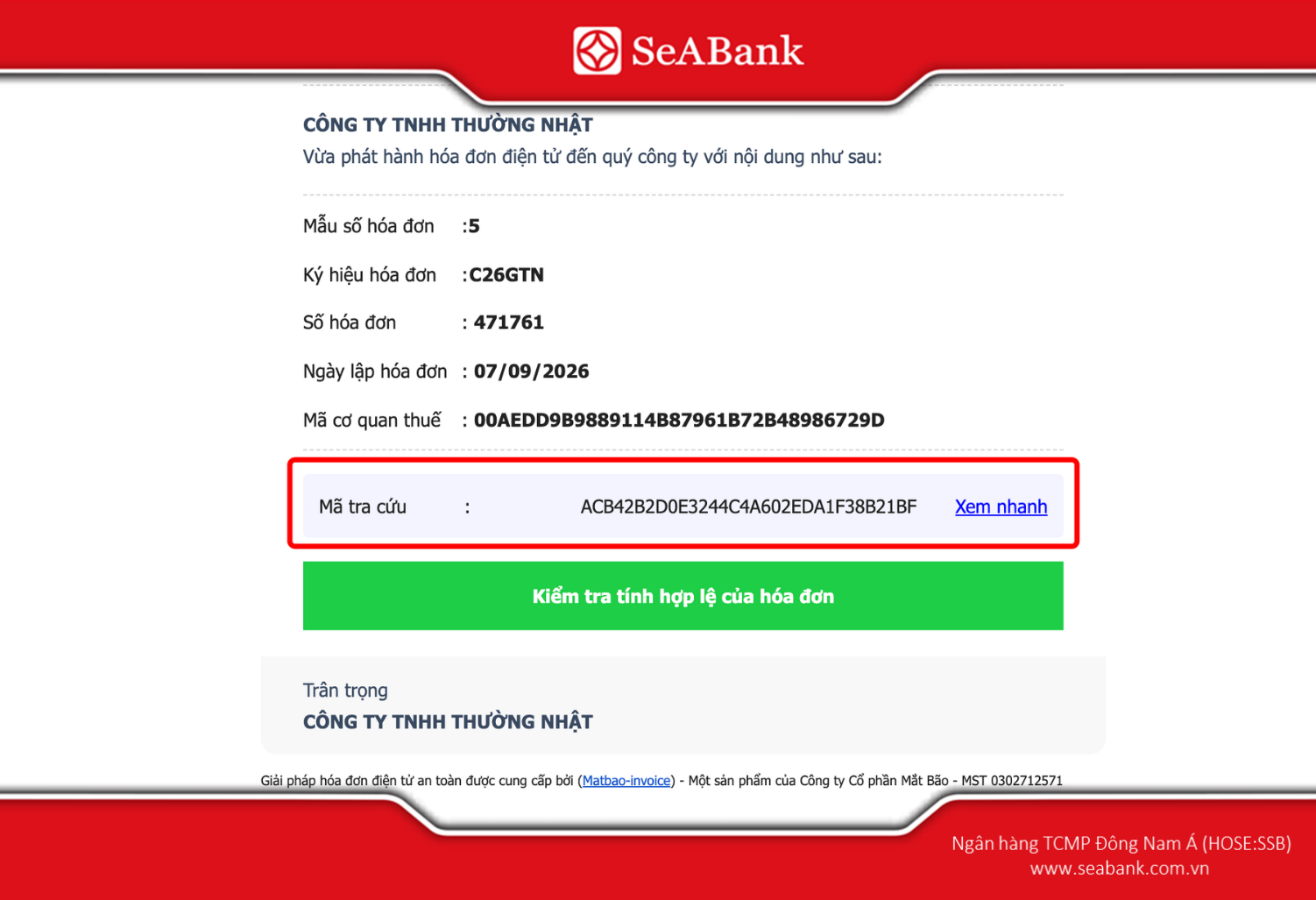
Electronic invoices are usually sent with a lookup code via email or text message. You can use this code on the lookup portal provided by the seller or electronic invoice service provider:
Step 1: Open the invoice email or notification to obtain the invoice number and lookup code.
Step 2: Access the lookup portal provided by the seller or electronic invoice service provider.
Step 3: Enter the invoice number and lookup code, then click Search.
Step 4: View, download the invoice, or check the information using the functions available on the portal.
Enter the invoice number and lookup code on the seller's portal to view the invoice
Important Notes When Looking Up Electronic Invoices
Carefully check the information entered, especially the invoice symbol, invoice number, and invoice date, as even one incorrect character may cause the system to report that the invoice does not exist.
If a newly issued invoice is not yet displayed, you should try looking it up again after a certain period of time or contact the seller.
Only enter login information on official portals and do not share your password or verification code with others.
FAQ About Electronic Invoice Lookup
1. What is electronic invoice lookup used for?
You can use it to verify whether an invoice exists on the system and check the seller's information and invoice status. This helps minimize errors in tax declaration and accounting records.
2. Do I need an account to look up electronic invoices?
Not necessarily. You can look up individual invoices without logging in. If you want to view a list of purchase and sales invoices by period, you need to log in using an account provided by the tax authority.
3. What should I do if I cannot find an invoice when looking it up?
Check the information you entered again. If the invoice was newly issued, try again after a certain period of time. If you still cannot find it, you should contact the seller directly for confirmation.
4. Where can I look up electronic invoices?
You can look up electronic invoices on the tax authority's electronic invoice system or on the lookup portal of the seller or electronic invoice service provider when you have a lookup code.
Understanding how to look up electronic invoices helps you verify the validity of documents, minimize errors, and take greater control of accounting and tax-related work. Depending on your needs, you can perform the lookup on the tax authority's system or the seller's lookup portal.
Southeast Asia Commercial Joint Stock Bank (SeABank)