Electricity Bill Lookup: Detailed Guide to Simple and Quick Methods
23/10/2026
Easily look up your electricity bill via website, Zalo, or banking app. See the detailed step-by-step guide and important notes when checking your bill.
Every month, many households still spend time waiting for notifications or going to collection points before knowing how much they need to pay. In fact, electricity bill lookup can now be done online in just a few minutes via electricity customer service websites, customer service apps, or banking apps. This article summarizes common ways to look up electricity bills in Northern, Central, and Southern Vietnam, together with step-by-step instructions to help you monitor and make payments on time.
Note: The figures and information in this article are compiled from general market sources and do not apply exclusively to SeABank's products.
Information required: Customer Code (Customer ID) - A unique identification string (usually starting with letters such as PA, PB, PE, PQ... depending on the region) issued by Vietnam Electricity (EVN) to each electricity consumer.
Where to find the Customer Code:
On previous notices/bills: Look for "Customer Code" or "Customer ID" right above the account holder's information.
Via periodic SMS/Zalo notifications: Debt reminders or electricity meter reading notifications from the electricity company.
Contact the Electricity Customer Service Center: Call the regional Customer Service (CSKH) Hotline and provide the account holder's name + Citizen ID number/registered phone number.
Depending on where you live and your app usage habits, you can choose one of the following lookup methods.
Method 1: Look Up Electricity Bills via the EVN Customer Service Website (3 Regions)
This is the official lookup method and provides the most complete details on electricity consumption as well as electronic bills.
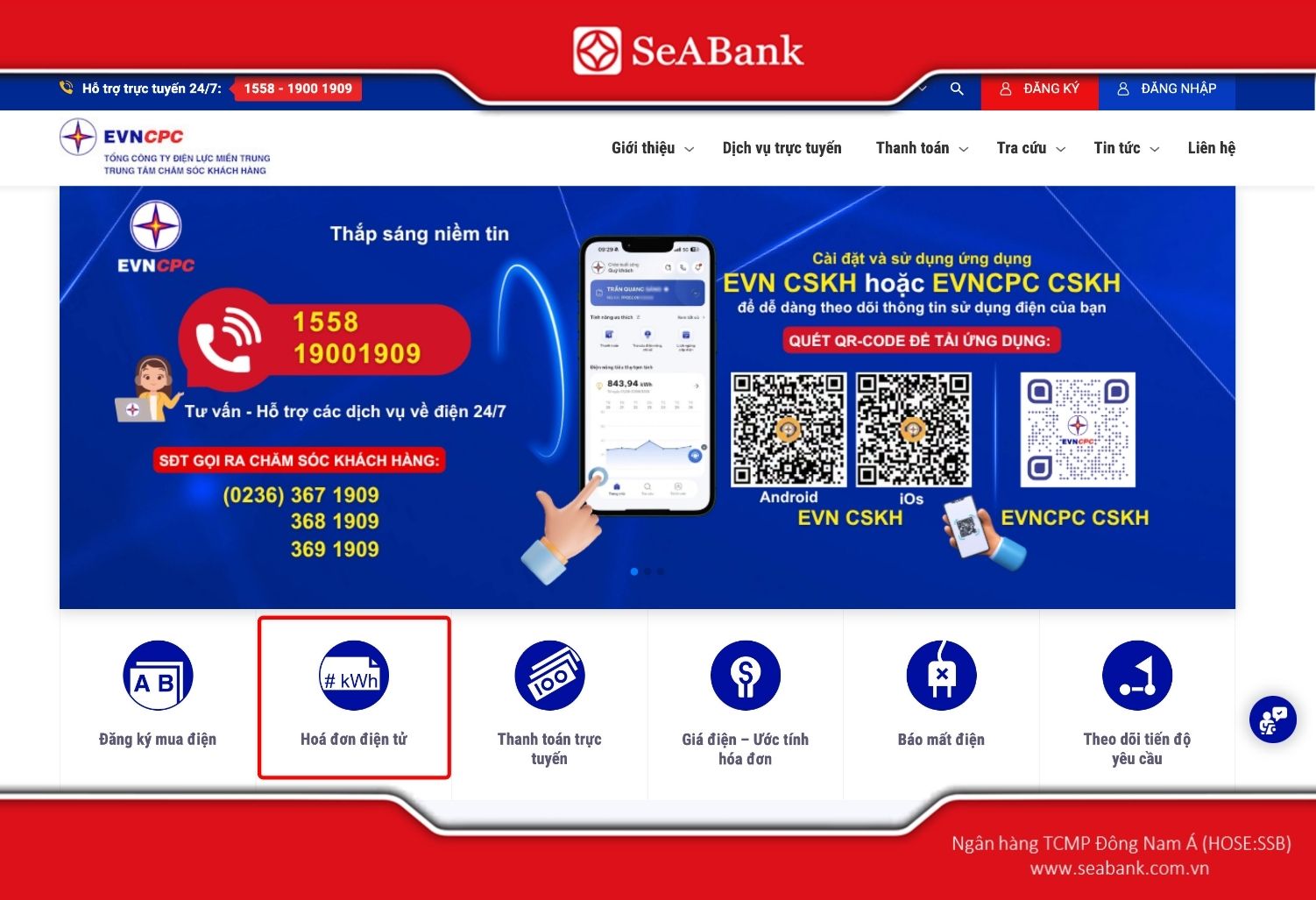
Step 1: Access the EVN Customer Service website for the area where you live:
Step 2: Log in to your account using the Customer Code.
Step 3: Go to Lookup > Select Electricity Bill or Monthly Electricity Meter Reading Lookup.
Step 4: Select the month/year you want to check to view electricity bill information and download the electronic bill if needed.
Look up electricity bills via the EVN Customer Service Website (3 Regions)
Method 2: Look Up Electricity Bills Using the EVN Customer Service App on Your Phone
Downloading the official customer service app helps you check daily electricity consumption and automatically receive monthly bill notifications.
Download the corresponding app:
EVNHANOI CSKH (Hanoi)
EVNNPC CSKH (Northern Vietnam)
EVNCPC CSKH (Central Vietnam)
EVNHCMC CSKH (Ho Chi Minh City)
CSKH EVN SPC (Southern Vietnam)
Log in: Enter the customer code and password (or register quickly using the linked phone number).
View the bill: Select "Bill Lookup" or "Electricity Consumption" to visually monitor electricity usage through charts.
Method 3: Look Up Electricity Bills via Zalo Official Account
Zalo is an extremely convenient tool that helps you look up electricity bills without downloading an additional app.
Step 1: Open Zalo and search for the keyword "ELECTRICITY CORPORATION" for your area (for example: Ho Chi Minh City Power Corporation, EVNNPC...).
Step 2: Tap Follow page.
Step 3: In the chat window, select Lookup > Register Information (enter Customer Code and phone number).
Step 4: Select Quick Bill Lookup to display the electricity amount payable.
Method 4: Look Up Electricity Bills via E-Wallets (MoMo, ZaloPay, Viettel Money...)
E-wallet platforms and digital banking services allow you to both look up and pay bills quickly in just a few steps.
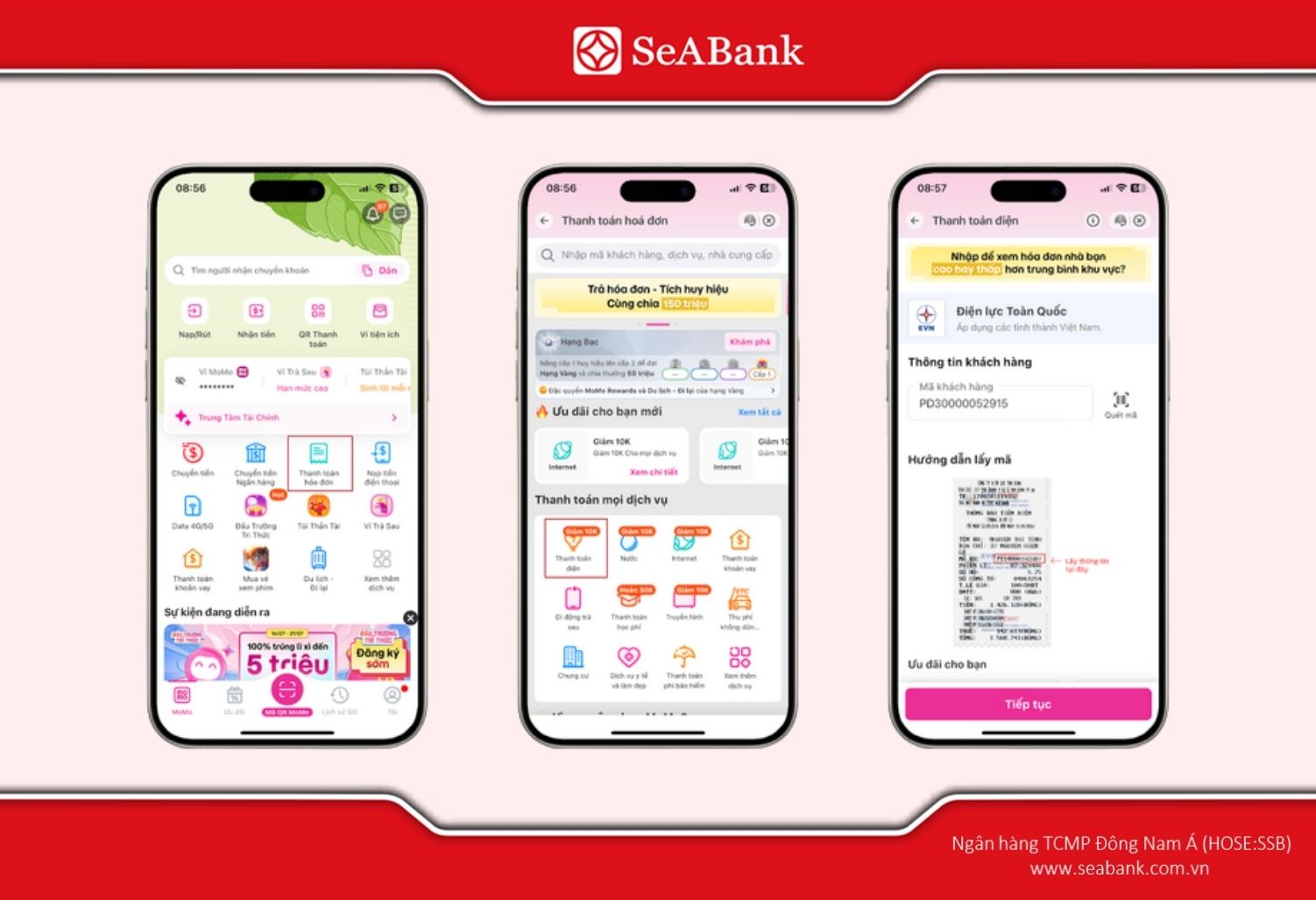
Step 1: Open the e-wallet app (MoMo / ZaloPay / Viettel Money).
Step 2: Select Bill Payment > Select Electricity Bill.
Step 3: Enter the Customer Code.
Step 4: The system will immediately retrieve the bill amount, payment deadline, and account holder information.
Look up electricity bills via the MoMo e-wallet
Method 5: Check via the QR Code on the Electricity Notice or via SMS/Hotline
Scan the QR code: If you have an electricity bill notice, simply open your phone Camera or the Zalo/Banking app to scan the QR code printed on the notice.
Call the Electricity Customer Service Hotline:
Northern Vietnam Hotline: 1900 6769
Hanoi Hotline: 1900 1296
Central Vietnam Hotline: 1900 1909
Ho Chi Minh City Hotline: 1900 54 54 54
Southern Vietnam Hotline: 1900 1006 - 1900 9000
Method 6: Look Up Electricity Bills in Northern, Central, and Southern Vietnam via Banking Apps
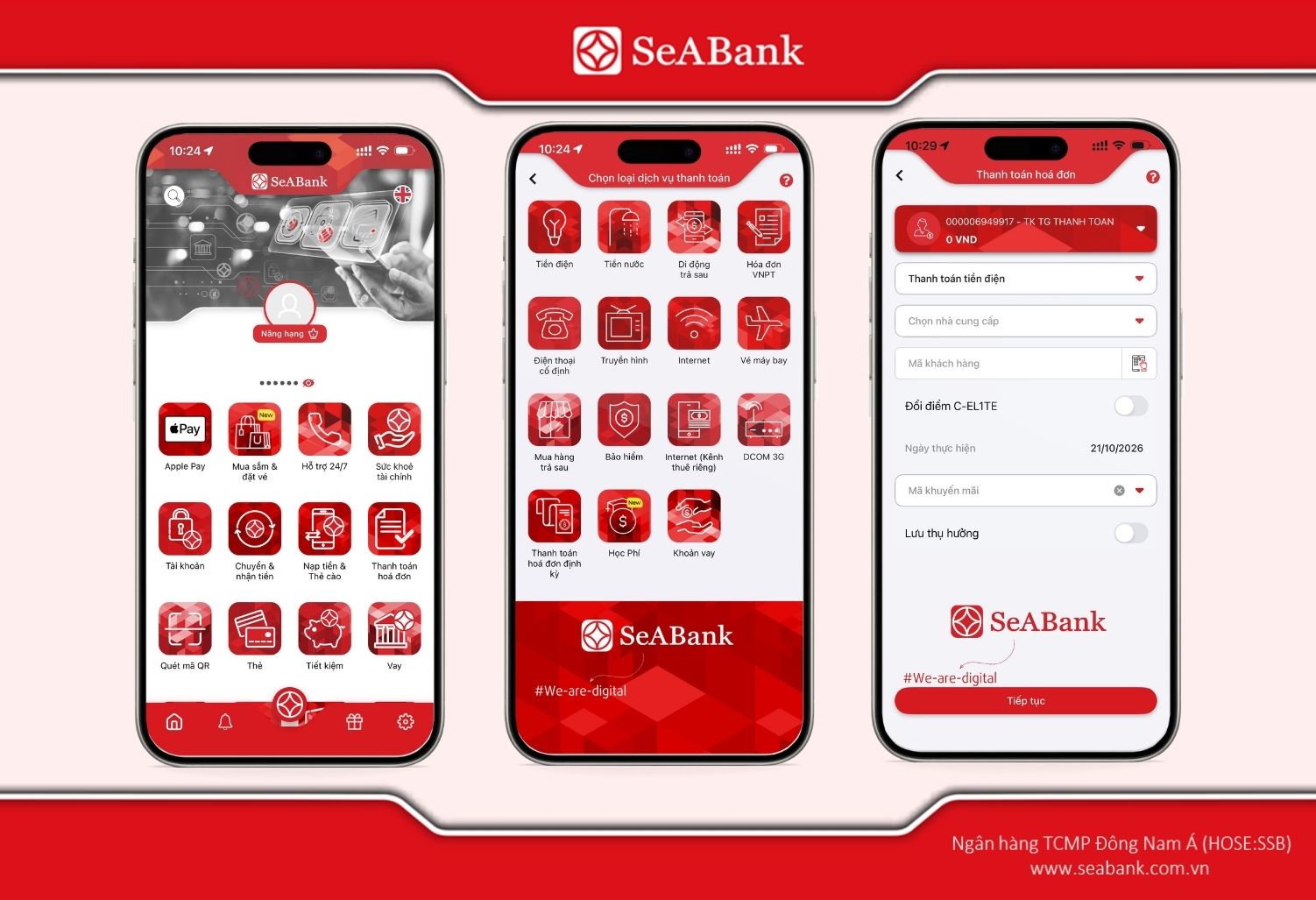
Many banking apps now integrate utility bill payment features, including SeABank's SeAMobile, which supports electricity bill lookup and payment directly on the app:
Open SeAMobile, select Bill Payment, then select Electricity.
Select the electricity provider for your area and enter the customer code.
Check the amount and billing period displayed on the screen before confirming.
Guide to Paying Electricity Bills on SeAMobile
If you want to both look up and pay in the same process, you can follow these steps on SeAMobile:
Log in to the SeAMobile App using your registered account.
Go to Bill Payment, select Electricity.
Select the electricity provider for your area and enter the customer code.
Check the displayed bill information (billing period, amount) before confirming.
Complete the payment. You can save the information so that future lookups and payments can be completed more quickly.
Looking up and paying electricity bills on SeAMobile can be completed in just a few simple steps
Frequently Asked Questions About Electricity Bill Lookup
1. Is There a Fee for Looking Up Electricity Bills?
Looking up bills through electricity customer service websites, apps, or Zalo is usually free of charge. When making a payment, some intermediary channels may charge a service fee, so you should check the displayed fee information before confirming the transaction.
2. How Can I Look Up My Electricity Bill If I Forget My Customer Code?
You can call the customer service hotline of the electricity company in the area where you use electricity to request assistance in retrieving your customer code.
3. How Is Looking Up Electricity Bills on a Banking App Different from Using the Electricity Company's App?
A banking app allows you to both look up and pay the bill in the same process, which is suitable if you want to manage this expense together with the bank account you are currently using.
Looking up electricity bills no longer takes much time if you choose the right channel, from websites and electricity customer service apps to Zalo and banking apps. If you want to both look up and pay in one process, you can use the electricity bill payment feature on SeABank's SeAMobile, register once, and the app will automatically save the information for subsequent billing periods.
Southeast Asia Commercial Joint Stock Bank (SeABank)