News
7 Simple Ways to Check Your Bank Account Number in Just 1 Minute
 10/11/2025
During transactions, money transfers or salary receipts, many people often forget or mistake their account numbers. In that case, checking a bank account number is a necessary operation to ensure the transaction is accurate and safe. With the development of digital technology, you can now quickly look up your account number in just a few minutes via phone, Internet Banking or at an ATM without having to go to the transaction counter.
Quick Summary
To look up your bank account number easily and simply, you can apply 1 of the following 7 methods:
- Method 1:Using Internet Banking website
- Method 2:Use the bank's Mobile Banking application
- Method 3:Query via SMS Banking
- Method 4:ATM inquiries
- Method 5:Check at the counter
- Method 6:Call the hotline
- Method 7:Look up information on transaction receipts
1. What is a bank account number?
A bank account number is a series of numbers that the bank issues to each customer when opening an account. This is a unique identifier that helps identify and perform financial transactions such as transferring money, receiving money, paying bills, or receiving salary. Each bank has its own account number structure, usually consisting of 10 - 16 digits, reflecting information about the branch, account type and customer code.
Distinguish between bank account number and ATM card number
Many people often confuse bank account numbers and ATM card numbers, however these are two completely different series of numbers, used for separate purposes.
- Bank account number: A series of numbers issued by the bank when you open an account, used to receive - transfer money, make payments or save transaction information. The series of numbers is displayed in Mobile Banking.
- ATM card number: A series of numbers embossed on the card surface, consisting of 16–19 digits, used to identify the card when making transactions via ATM, POS or online payment. This number is not used to receive direct transfers.
In short, the account number helps you make financial transactions, while the ATM card number only serves to identify and pay by card. Understanding these two concepts correctly helps avoid confusion, especially when receiving or transferring money through the bank.
2. 7+ Ways to quickly look up bank account numbers
2.1. Using Internet Banking
This is the fastest and most accurate way to look up account numbers for customers who have registered for e-banking services.
You just need to access the Internet Banking of the bank, log in with your username and password. Then, you go to "Account" or “Account Information”, the system will display the account number, account holder name, branch and current balance.
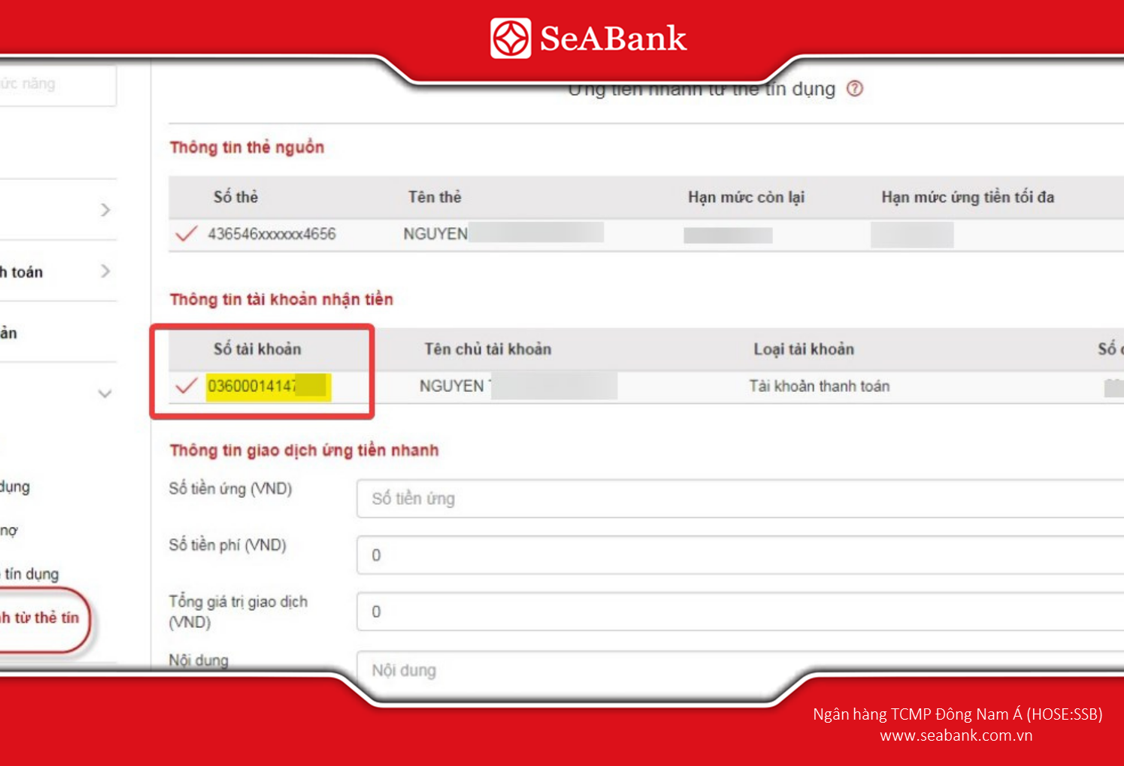
Account numbers can be found on SeABank's SeANet Internet Banking system.
2.2. Use the bank's Mobile Banking application
Mobile Banking is an application installed directly on the phone, helping users look up account numbers anytime, anywhere.You open the banking app, log in and select the item “My Account” or “Account Information”. All information such as account number, balance, transaction history will be displayed immediately.
On SeAMobile, customers can see the bank account number displayed on the main screen after successfully logging into the application.
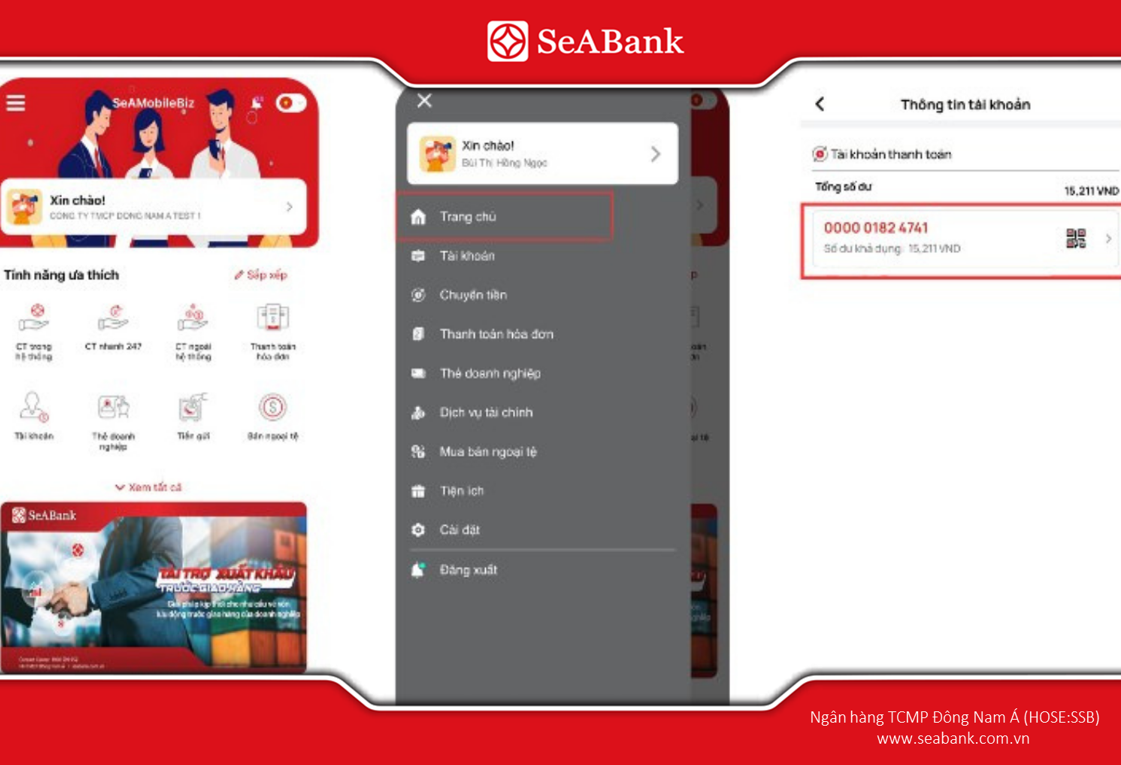
Searching on mobile banking is very convenient, fast and safe.
2.3. Query via SMS Banking
If you have registered for SMS Banking service, the bank will automatically send a message notifying you of balance changes after each transaction. This message usually displays the account number or the last 4-6 digits of the account. In addition, you can also compose a message according to the syntax of each bank to check account information.Depending on the bank, SMS Banking can display the full account number or only part of the number (last 4-6 digits).
2.4. Inquiry via ATM
You can also look up your bank account number directly at the ATM using your ATM card..
Cardholders simply insert their card into the machine, enter their PIN, and select the item.“Account Information” or “Account Information”, then the screen will display account number, account holder name and current balance. In addition, some banks also support print receipts, which displays the account number, helping you easily save the information for use when needed.
2.5. Look up at the transaction counter
If you do not use e-banking services, you can go directly to the transaction counter to get staff support to look up your account number.When you go, you need to bringID card/CCCD or passport to verify your identity. Bank staff will help you check and provide the correct account number information.

Going directly to the transaction counter is suitable for the elderly or those who are not familiar with operating on the application, while ensuring absolute accuracy and security.
2.6. Call the hotline
When calling the bank's hotline, you will be asked to provide personal information such as full name, date of birth, ID card number/CCCD, registered phone number to open the card and possibly the card number or the most recent transaction information for the staff to verify. After checking, the hotline will support the notification of the account number.
At SeABank, customers contact Hotline: 1900 555 587 (applicable to Vietnamese subscribers,fees according to network operator regulations).SeABank's customer support hotline will operate 24/7 to provide maximum support to customers.
2.7. Look up information on transaction receipts
In many cases, your bank account number can be found on your transaction receipt. For example, when you make a deposit, withdrawal, or transfer at an ATM or teller, the printed receipt will usually show the sender or receiver's name and account number. So, if you forget your account number, you can check your most recent receipts or transaction statements to find the necessary information.

You can transact through ATM to read the account number on the receipt
3. Notes when looking up bank account numbers
Although looking up bank account numbers is quite simple and can be done in many different ways, users still need to pay special attention to ensure the safety of personal information and avoid confusion during transactions.
- Do not confuse the account number with the ATM card number. These are two different series of numbers — the account number is used to make transactions (transfer, receive money), while the ATM card number is only used to identify the card when withdrawing money or making payments.
- Never provide your account number, OTP code or personal information to strangers.
- You should note or save the account number on your phone for use when needed.
- If you lose your card or suspect information disclosure, please contact the bank's hotline immediately for support in temporarily locking your account.
4. Open a bank account quickly and simply at SeABank
SeABank (Southeast Asia Commercial Joint Stock Bank) is one of the leading prestigious banks in Vietnam, standing out with its modern technology platform and dedicated customer care service. With a nationwide network and a strong digital banking ecosystem, SeABank helps customers open accounts, make transactions and manage finances easily anytime, anywhere.
When opening an account or issuing a card at SeABank, customers will enjoy many attractive incentives such as:
- Free account opening and service maintenance on the digital platform.
- Free internal and external system fund transfers applied according to specific incentive programs and account types.
- Receive preferential interest rate account packages, cashback, or reward points when transacting frequently.
- Fast issuance of debit or credit cards, integrated with QR and contactless payment.

SeABank has become the top choice for individual and corporate customers who want safe and fast transactions.
Customers can open an account online in just a few minutes via the SeAMobile application or the SeANet website without having to go to the counter. The steps are extremely simple:
- Step 1: Download the SeAMobile app or visit the SeANet page.
- Step 2: Select “Open an account online” and enter your personal information as instructed.
- Step 3: eKYC authentication by taking a photo of ID card/CCCD and face. The eKYC authentication process is carried out in accordance with the regulations of the State Bank of Vietnam on electronic identification.
- Step 4: Complete registration – account will be activated immediately and can be used for transfers, payments, salary receipts,...
5. Frequently Asked Questions
1. Is there a fee to view bank account numbers?
No. Checking your bank account number is completely free via the app, Internet Banking, SMS or call center, depending on each bank's policy.
2. Can I look up my bank account number using my ID card/CCCD number?
Yes. You can go to the bank's transaction counter and present your ID card (CMND/CCCD) for staff to assist in quickly and accurately looking up the account number.
3. Can I check someone else's bank account number?
No. Account number information is personal security, and only the account holder has the right to look it up or request the bank to provide it when necessary.
Checking the bank account number today has become extremely simple, helping you check and manage your finances easier than ever. Whether done via mobile application, SMS, or at the counter, as long as you follow the instructions correctly, you can quickly obtain your account information safely and accurately.
Especially, if you want to open or manage an account effectively, SeABank is a reliable choice with fast, convenient, and highly secure services. Currently, SeABank offers free account opening and many service fee incentives for customers registering for digital accounts or using SeAMobile/SeANet.
If you want to learn more about SeABank's savings or loan products, you can contact the nearest transaction points or call Hotline 1900 555 587 (call charges according to network provider regulations) or visit the website www.seabank.com.vn for more detailed information.