News
Guide to checking traffic violations (cars and motorcycles) online in 2026
 21/01/2026
Instructions on how to check traffic violations for cars and motorcycles in 2026 on the Traffic Police Department, the Vehicle Registration Department, the VNeTraffic app, etc., are complete and accurate.
"Traffic fines issued remotely" are a method of handling traffic violations based on data recorded from surveillance cameras or professional equipment used by law enforcement. Self-checking for remote fines helps vehicle owners proactively understand their violation status, avoiding suspension of vehicle registration or unnecessary legal issues. This article compiles quick, accurate, and completely free ways to check for remote fines from reliable and official sources.
1. Check for traffic violations detected by cameras on the website of the Traffic Police Department
The website of the Traffic Police Department is one of the most reliable channels, allowing citizens to directly access traffic violation data recorded from the national camera system.
To do this, follow these steps:
Step 1:Access the official lookup page of the Traffic Police Department: https://www.csgt.vn/tra-cuu-phuong-tien-vi-pham.html
Step 2:Enter the license plate number, select the vehicle type (car/motorcycle), and fill in the verification code as requested.
Step 3: Press "Search" to see the results.
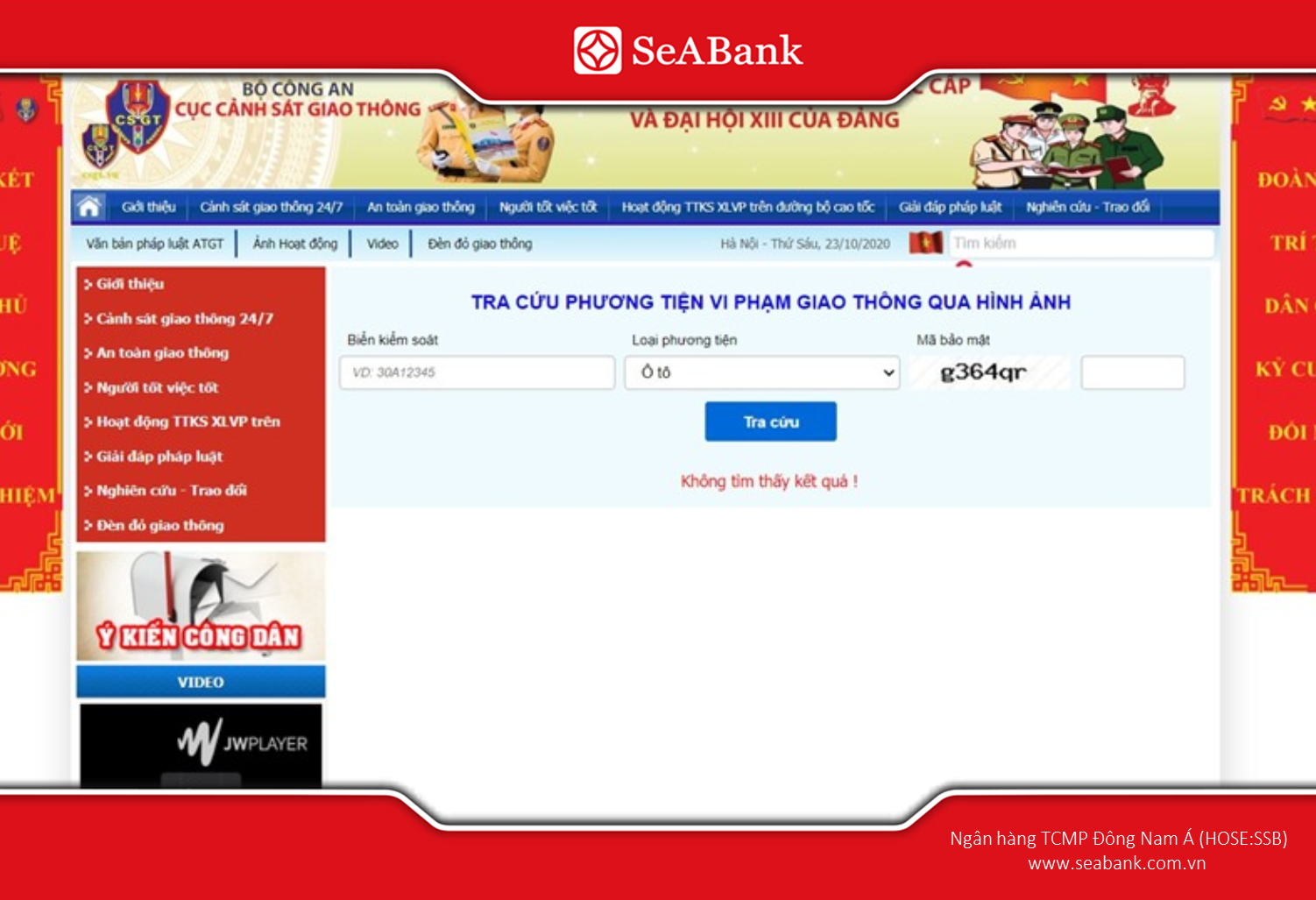
Official source for checking traffic violations (fines issued remotely) from the Traffic Police Department.
If the system doesn't display any data, it means the vehicle hasn't been recorded for a violation or the traffic violation notice hasn't been updated in the system. This method is highly reliable because the data is extracted directly from the authorities, ensuring transparency.
2. Check traffic violations detected by cameras on the Vietnam Register (VR) website.
Checking with the Vehicle Registration Department helps you determine if your vehicle is subject to registration restrictions due to outstanding traffic fines.
To search, follow these steps:
Step 1: Visit the website of the Vietnam Registering Authority: https://www.vr.org.vn/
Step 2: On the homepage, scroll down and select "Motor vehicles for vehicle owners" under category "Data lookup".
Step 3: Enter all the required verification information.
Before proceeding, please note some formatting guidelines:
- For vehicles with 5-digit license plates: add a character at the end according to the license plate color: T (white), X (blue), V (yellow).
- When entering the certificate stamp number: you must type it in the correct format with hyphens, for example: KC-123456.
Step 4: Scroll down to the section "Announcement from the authorities" to check the results.
- If no data is returned, the system has not recorded a violation at the time of the search..
- If there is a black frame and an error message: The vehicle has an outstanding violation and may be refused registration.
This lookup method is especially useful when a vehicle is due for inspection, helping owners save time and proactively handle related obligations.
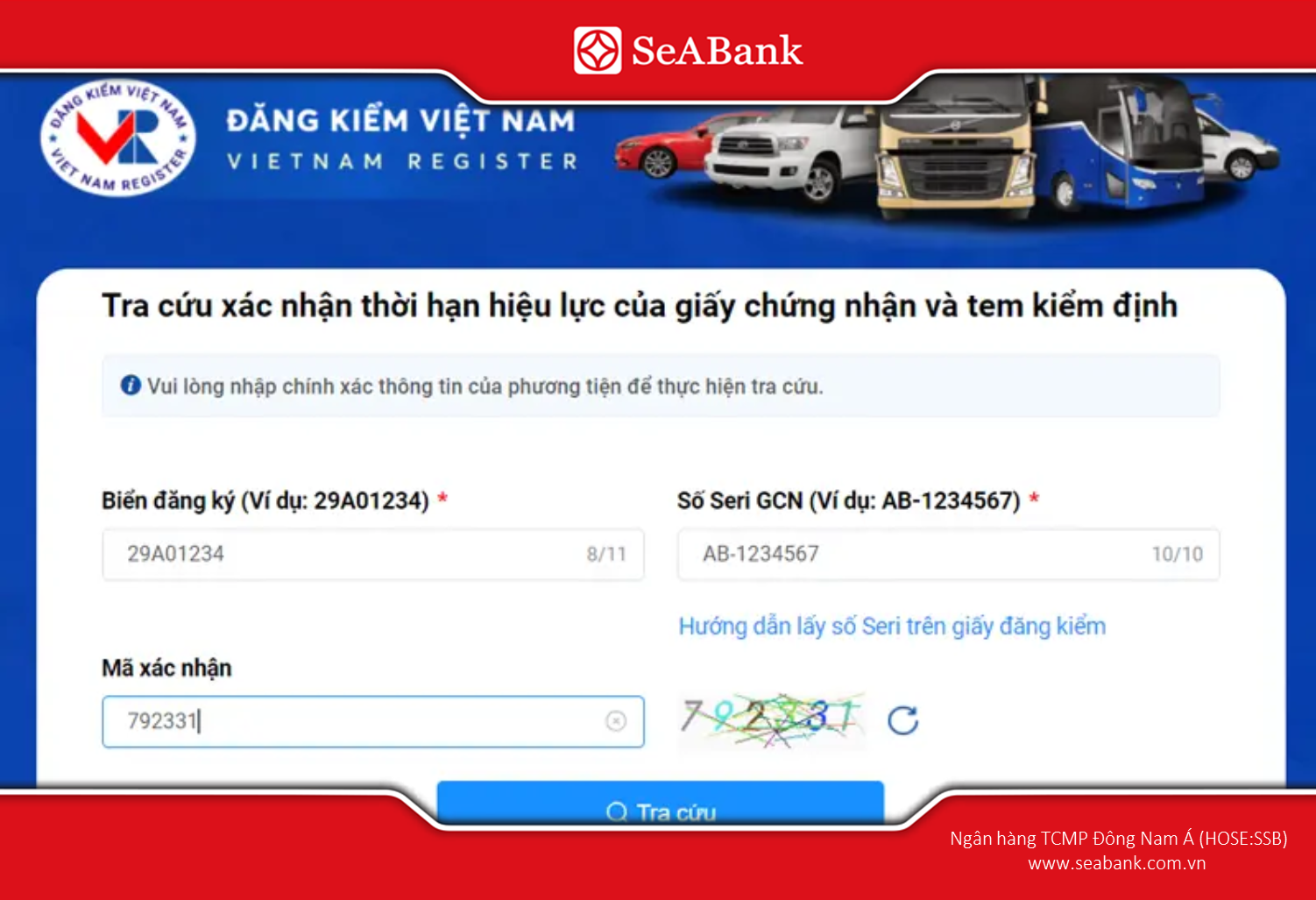
Check the status of traffic violations detected by cameras on the Vietnam Registering Authority's portal.
3. Check traffic violations detected by cameras through the VNeTraffic app.
The VNeTraffic application, developed by the Traffic Police Department, allows citizens to check traffic violations directly on their mobile devices, which is more convenient than searching via the website.
To begin, follow these steps:
Step 1: Download the VNeTraffic app from the App Store (iOS) or CH Play (Android).
Step 2: Log in to your account. If you don't have one yet, you can quickly register by scanning the QR code on your citizen ID card, then entering your phone number and creating a password.
Step 3: On the home screen, select the feature "Check for violations".
Step 4: Enter the license plate number and press Enter "Check".
If no data is returned, your vehicle has not yet generated an error that needs to be addressed.
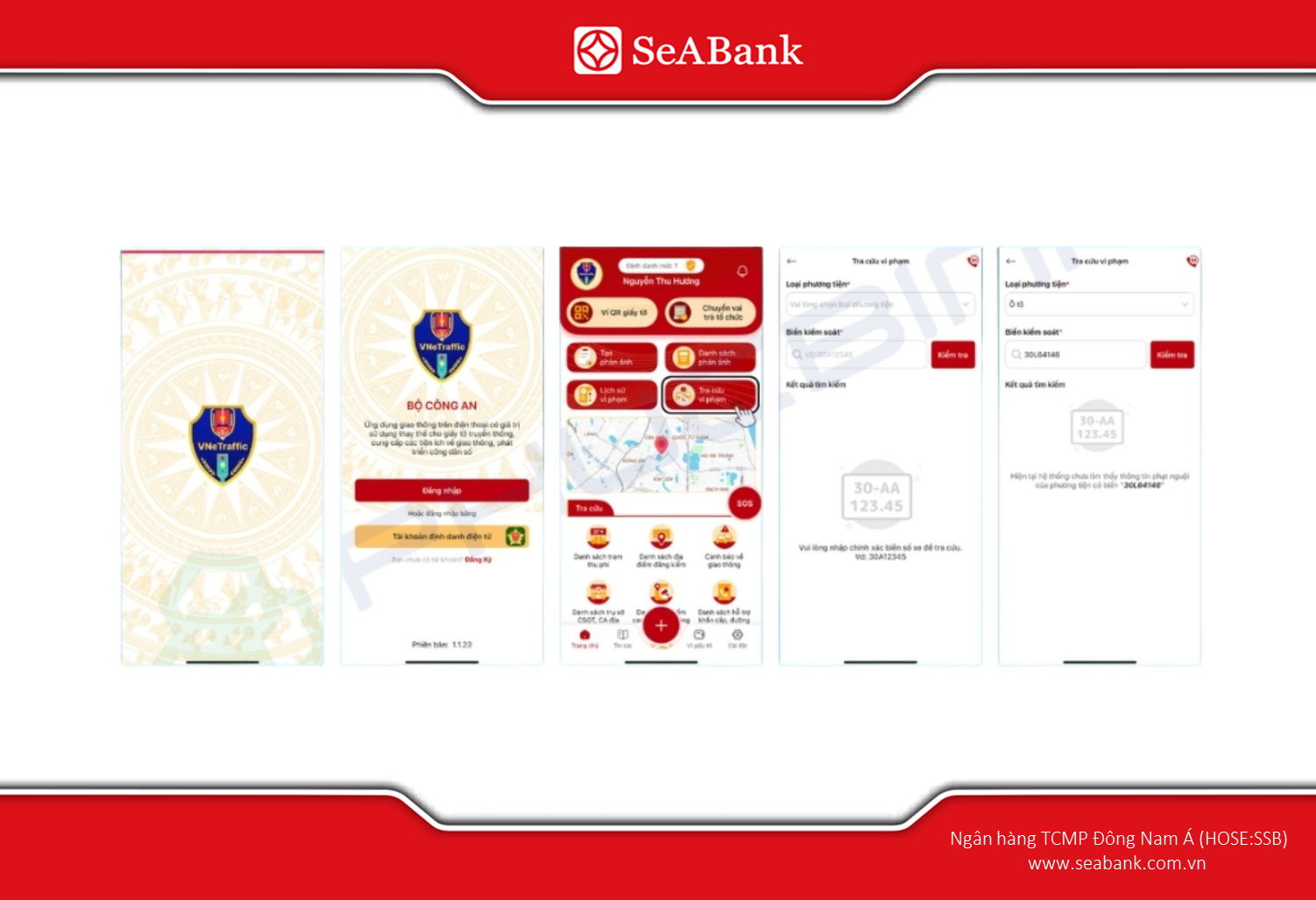
Quickly check traffic violations on the VNeTraffic app.
4. Reasons why you should check traffic violations regularly.
Regular checks help vehicle owners proactively monitor for violations and offer many practical benefits:
- Reduce the risk of being rejected during vehicle inspection: Unresolved traffic violations can result in vehicles being denied inspection certificates, directly impacting their ability to circulate.
- Proactively address violations: Early detection allows drivers to pay fines promptly, avoiding enforcement actions or late payment penalties.
- Protecting your rights when buying and selling vehicles: Checking for traffic violations helps buyers determine if a vehicle has any outstanding violations, avoiding costs and legal risks after the transfer of ownership.
Regular checks are not only an obligation but also a way to protect the rights of the vehicle owner.
5. What should you do when you discover that your vehicle has a traffic violation that requires a fine?
When the system displays information about traffic violations, vehicle owners need to follow the correct procedure to ensure that the processing is quick and transparent.
The procedure is as follows:
- Contact the unit that recorded the violation: The processing unit's information is displayed in the search results. You should bring all necessary documents, including your vehicle registration, inspection certificate, and ID card/citizen identification card, for verification.
- Fulfilling the obligation to pay the fine: You can pay at the State Treasury, authorized banks, or online through the National Public Service Portal. Electronic payment methods through banks like SeABank make the fine payment process quick and secure.
Complying with traffic fines not only helps ensure timely vehicle inspection but also demonstrates a commitment to complying with traffic laws.
Checking traffic violations is an important step for every road user to monitor their violation status, avoid legal risks, and ensure their vehicle meets all traffic regulations. Thanks to online lookup channels, the checking process is quick, easy, and completely free.
To make the process of handling and paying traffic fines more convenient, you can choose to pay through digital banking channels to save time and ensure transaction security. If you are using SeABank's services, the SeAMobile application also supports you in making payments flexibly and quickly when needed.
Related News
46 Cases eligible for exemption/reduction of land use fees 12/02/2026
2 of the MOST STANDARD methods for paying into the state budget in 2026 26/01/2026
Personal documents that will not be accepted by banks for transactions from January 1, 2026 26/01/2026
4 Latest Land Policies - Updated 2026 26/01/2026
Updated regulations on personal income tax for 2026 and how to calculate it accurately 26/01/2026

46 Cases eligible for exemption/reduction of land use fees
This article will provide information on what people need to know about land use fee exemptions and reductions from 2026.
12/02/2026
Read more

2 of the MOST STANDARD methods for paying into the state budget in 2026
Guide to 2 ways to quickly and accurately pay money into the state budget this year.2026.
26/01/2026
Read more

Personal documents that will not be accepted by banks for transactions from January 1, 2026
Learn about different types of personal documents that will not be accepted by banks in certain banking transactions according to new regulations, effective from January 1, 2026.
26/01/2026
Read more